I’m an XR engineer. I spend my days building prototypes for head-mounted displays. I’m always on the hunt for research that actually moves the needle to get us closer to the dream interface on the horizon:
A standard XR operating system model that everyone in the world can agree is table stakes for spatial computing interaction
There will be a standard OS interaction model, A.K.A. a keyboard+mouse equivalent to engage with some set of metaphors (e.g. windows, icons, menus, and pointers), but for spatial computing.
That interaction model doesn’t exist yet. Some people think it does since there are a dozen XR “operating systems” from big tech companies now, but the workers at these companies don’t know what the model is yet. The laser pointer to a flat floating window is not it.
We’re in the 1950s era. The mouse doesn’t exist yet. 6DOF controllers are not the mouse of XR. Hand tracking is not the mouse of XR. The mouse of XR is the stuff that happens to enable you to access your canvas. You have ALMOST no access to your canvas today because we have yet to invent the interaction model that will give you access. If that sounds strange, hopefully it’ll make sense by the end of this post.
I believe eye tracking will be a big part of the dream interface, but it needs to feel magical, not gimmicky. About 8 years ago, I started digging into HCI papers because I found my colleagues in industry were mostly rehashing bad legacy design habits, and I was sure there must be a better way.
Researchers are often more willing to try out-of-the-box ideas than many industry designers who are locked into shipping schedules and familiar patterns. Plus, researchers tend to be more humble about letting the scientific method lead them to the promised land.
So they’re the ones taking us to the promised land… right? Right?
SIGCHI and the Briar Patch
At SIGCHI, the biggest HCI conference AFAIK, there’s a whole section on Gaze As Input:
But even the best university work frequently stays trapped inside legacy paradigms in my opinion. We’re all so deep in the WIMP (Windows, Icons, Menus, Pointers) box that breaking out feels near-impossible. What is it about the human race that makes us insist on operating so incrementally?
My favorite paper from this year’s SIGCHI Eyes As Input was:
Eyes on Many: Evaluating Gaze, Hand, and Voice for Multi-Object Selection in Extended Reality
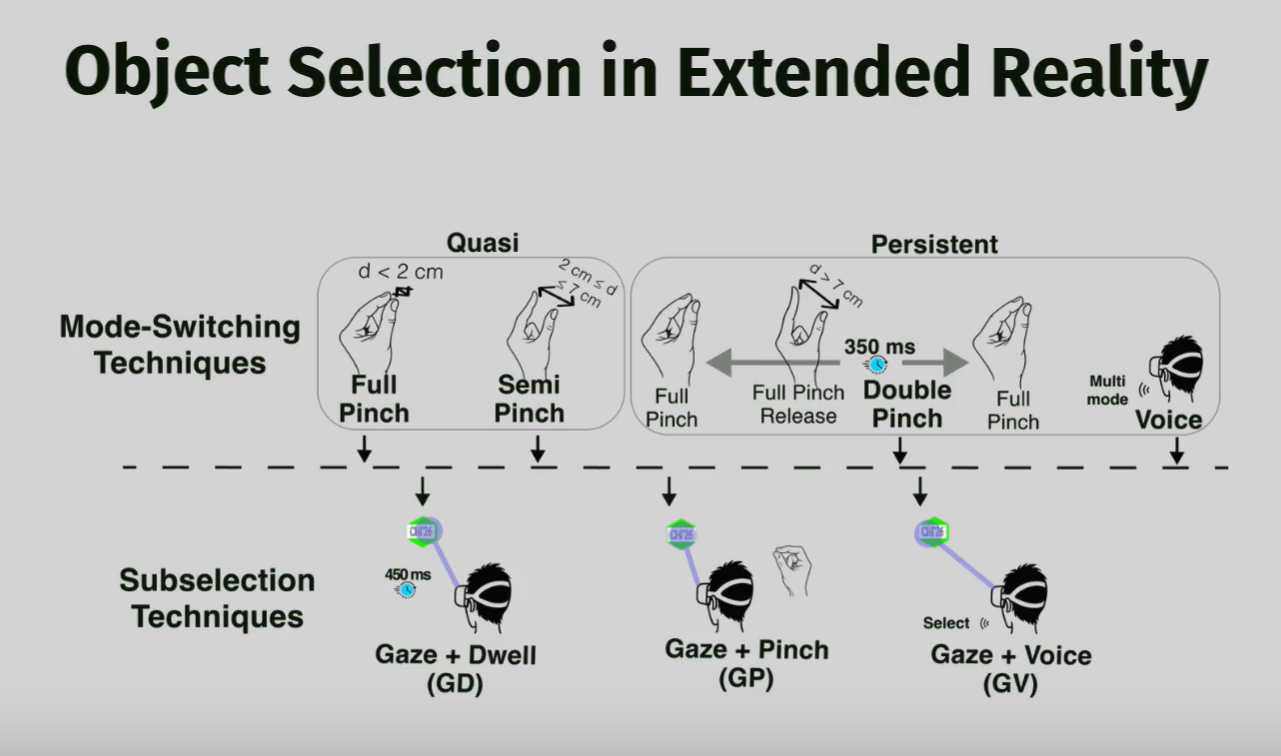
This paper covers important ground on multi-selection, but I feel like there’s a briar patch of bad UX hiding all the gems of future interface wisdom, and I sense even universities are afraid to hack deep into that briar patch.
Get dirty. Get cut. Hack deeper.
This paper grazes the surface of an underexplored problem: how do you efficiently select multiple objects in XR?
For years, I’ve had a set of similar questions I’d like researchers or industry to answer on XR multi-selection:
- What is the equivalent of CTRL+click+click+click to select a disparate collection in XR?
- What is the equivalent of SHIFT+click-first+click-last to select a contiguous range in XR?
- What does “contiguous” even mean in a spatial context when items are not necessarily arranged in just one or two dimensions, but in some kind of cluster or volumetric region?
- What is the equivalent of drag-select in 3D space with 6DOF capability? Does it entail defining selection zones shaped like primitives (cubes, spheres, something else)?
Unfortunately, this paper answered very few of my questions. It’s a swing at the first few branches of the briar path, but there are thousands more brambles to cut.
The Nuts and Bolts of the Paper
Modes
- Quasi — sustained action i.e. pinch-hold
- Persistent — latching toggle i.e. pinch-release on and pinch-release off
Mode-switching (entering/exiting multi-select): FullPinch, SemiPinch (quasi-modes that require holding), DoublePinch, and Voice (persistent modes).
Subselection (actually picking targets): Gaze+Dwell, Gaze+Pinch (dominant hand), and Gaze+Voice.
Key results:
- Persistent modes (especially DoublePinch) generally outperformed quasi-modes. SemiPinch in particular was fatiguing, unstable, and error-prone.
- DoublePinch + Gaze+Pinch was the winning combination for speed, accuracy, and user preference.
- Voice was promising for mode-switching (low physical effort) but less ideal for repeated per-object subselection.
- The study provides solid empirical data on error rates, task completion time, fatigue, and subjective feedback, plus clear design recommendations.
Though I love that researchers are hacking at the multi-modal briar patch at all, I worry that industry folks will take bad conclusions from papers like this and create experiences that are not practical in this early stage of modern spatial computing.
Where Industry Might Misread the Research
The paper gives designers and engineers concrete signals:
- Prefer persistent over sustained gestures.
- Lean on gaze + dominant-hand pinch for precise work.
Both of these conclusions can be deemed “good advice” according to this perfectly valid research. Both of these bullet points are terrible advice in my opinion—through no direct fault of the researchers.
1) Persistent vs. sustained gestures
Sustained gestures (i.e. finger-tap-hold) are assumed worse than persistent gestures (i.e. finger-tap-release to toggle). This is flat-out wrong, and I can explain why. Due to a robust body of ergonomic research in HCI generally steering us all in a direction of “fatigue bad,” I sense that researchers are on a hair trigger ready to conclude ANY sign of the slightest fatigue is automatic failure when assessing the viability of an interaction model. That’s a problem because it potentially kills our open-mindedness to explore what will possibly become the BEST interaction models.
Everyone white-knuckled the steering wheel on their first attempt to drive a car. My arms were tired after my first drive. That doesn’t mean the steering wheel should never have been invented. When I taught 300 drum students in college, EVERY student white-knuckled the sticks on their first lesson. Most people probably white-knuckled their first attempt at a mouse click. First-time users are primed for fatigue even when using what could become the most ideal interaction models. There is a way to fatigue yourself during almost any interaction, and noobs are prone toward that bad technique when trying any new and foreign interface.
Fatigue is important to note in research, but as long as it’s muscle fatigue and not joint fatigue, it is not an automatic dealbreaker. I learned from teaching drum students that tired forearm muscles simply mean they’re gripping the sticks too hard. It’s quite easy to correct. This falls squarely outside the realm of a researcher’s responsibility… it’s the job of prototypers who implement the research to navigate these nuanced waters. The researcher cannot tell the focus group to stop white-knuckling without tainting their results, but prototypers in industry CAN and SHOULD build a tutorial in some cases to alleviate potential fatigue rather than throwing the baby (a great interaction model) out with the bath water.
2) Gaze + pinch for precise work
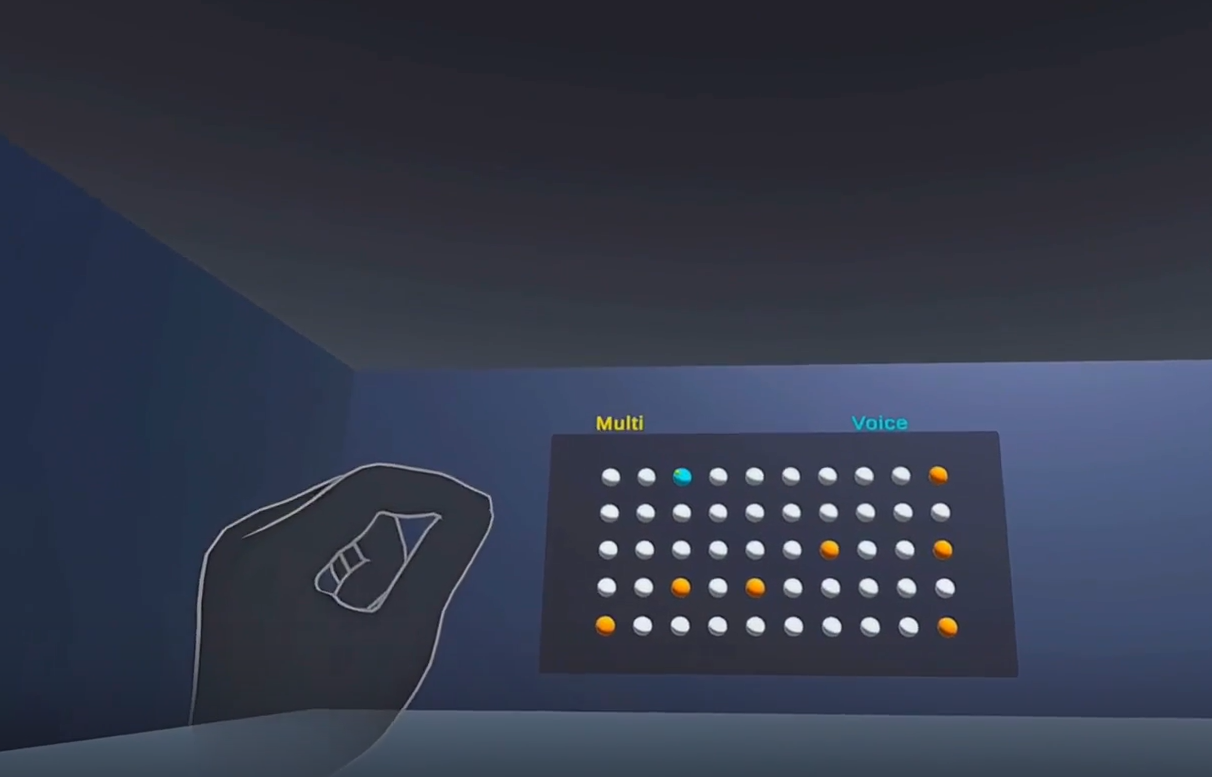
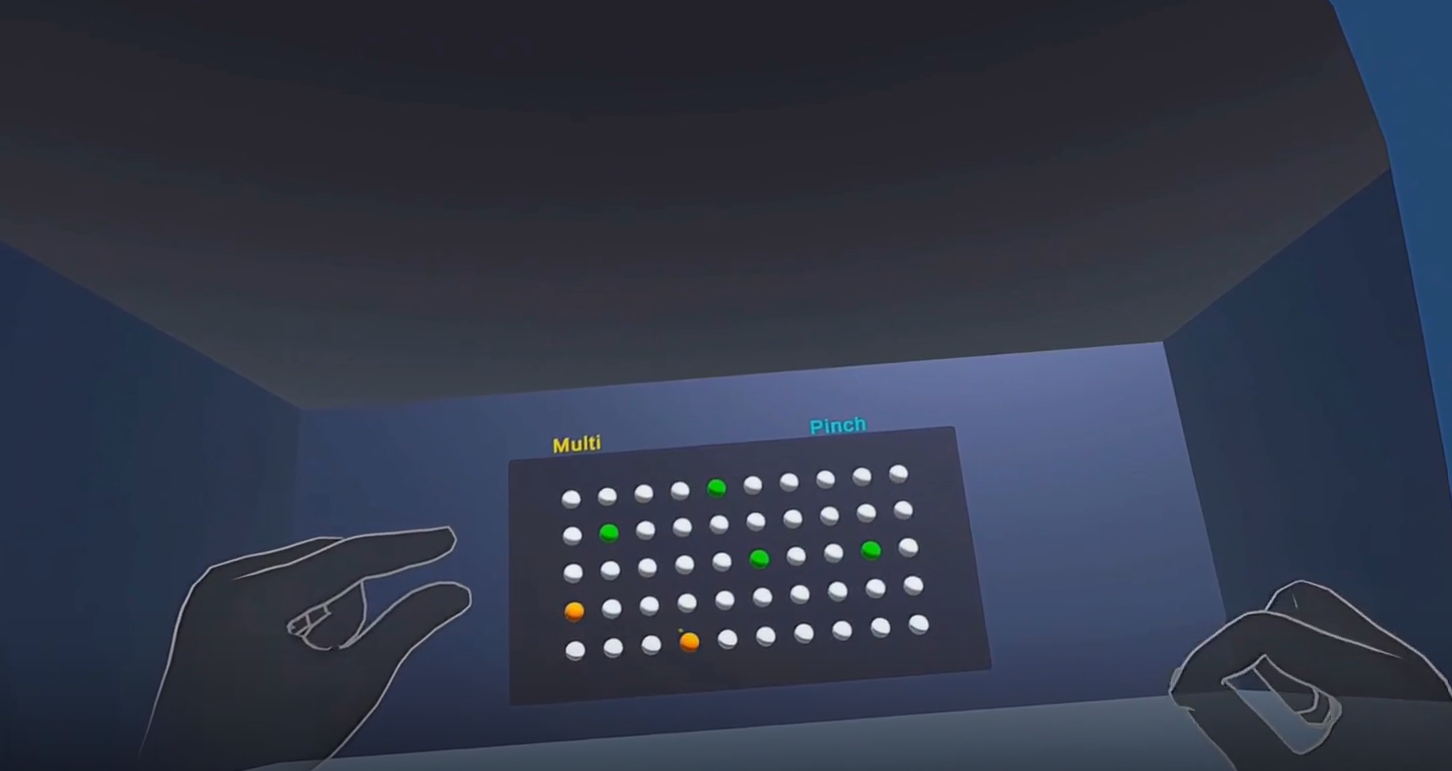
Gaze + pinch for precise work sounds nice on paper, but when I look at the prototype this research study actually gave to users, I’m forced to conclude their UX seems deeply uncomfortable. They show a 2D grid of spheres, each representing a selectable item. The paper is about multi-modal multi-select. I’m with it that far, but it makes two assumptions that lose me:
a) Gaze-for-hover is treated as a given.
Even though they meticulously cover the fact that long-gaze-for-selection is obviously worse than gaze-for-hover+secondary-action-for-select, they assume there’s nothing wrong with gaze-for-hover being present in all tested options. Gaze-for-hover is a problem in and of itself. They should have tested THAT. Apple did their best with gaze-for-hover on Vision Pro, and the results were less than stellar. I don’t believe gaze-for-hover will be of use in the standard XR operating system 20 years from now because it will create persistent eye strain for everyone.
Our eyes can differentiate a quantized separation between many small selectable items, but staring at any one of those to hover will reveal itself to be completely unreliable given enough research. The paper should have tested options that don’t have gaze-to-hover at all. I suspect any option that avoids gaze-to-hover will probably yield benefits over all the test options. You might wonder what CAN gaze do if not at least hover let alone select. There’s a little-explored area of research around gaze-to-localize-field-context—i.e. don’t make the user stare at small objects, but do let gaze dictate which object collections in a sub-field of the whole visible field become interactable. Where are the papers on that? It’s obviously the win we need for eye tracking to become useful. Gaze is a low-fidelity attention designator that we use subconsciously. It confuses researchers because it SEEMS high-fidelity. We CAN stare at a small object, but our eyes dart easily across multiple objects and there’s no way the exact gaze vector can convey whether we intend to pay attention to the first object, the second, or both at the same time—thus the useful event-triggering fidelity is always low. So why shouldn’t we use eye tracking the way evolution designed it?
b) The thing we’re gazing upon is a flat 2D plane.
The paper (like so much XR research) tests variations within a fundamentally WIMP-flavored model: users cast a gaze cursor onto objects arranged on a 2D grid floating in 3D space. Why? All the A/B/C comparisons are refinements of how we point-and-confirm on that plane.
This is a failure to begin outside the box. SOMETIMES a designer will be lazy and deliver a UI in a boring 2D grid just like familiar desktop and touchscreen counterparts, but why do we need HMDs if that’s all we’re going to do? What if there’s no grid? How can I multi-select volumetrically without one? Why are no papers trying to answer THAT question?
The Orange Slice Problem
Don’t get me wrong — this is valuable incremental work. But it highlights how deeply we’re stuck in legacy thinking. Why are we still projecting 2D selection metaphors into 3D environments even at the research level? Real XR scenes aren’t required to neatly line up interactables on flat grids. Objects can be scattered volumetrically in clusters at different depths, orientations, and levels of transparency.
When you zoom out, the primary failure I see all too often is researchers and designers thinking of interactivity in terms of planar surfaces rather than volumes. The canvas in XR is not a 2D grid of pixels. It’s billions of voxels in the shape of an orange slice. The orange slice is a volume shaped like a quarter sphere centered on the user’s face whose rind is about 100ft of depth away. The orange slice encapsulates EVERY tiny 3D spot in the entire visible field. THAT is the interactive canvas in XR. The word “canvas” isn’t even the right metaphor because a canvas is flat.
- In 2D, the canvas is a grid of pixels. Via keyboard/mouse, we have equal rapid access to every pixel.
- In spatial computing, the OCEAN (not the canvas) is a field of voxels shaped like a giant orange slice (assuming the user continues facing in one general direction and mostly moves just their eyes). Via eye tracking, hand tracking, 6DOF controllers, and voice there is still NO WAY to access every voxel today—not because we can’t, but because even our best researchers aren’t trying to.
What does volumetric multi-selection even look like? I have no idea — and that’s the point. I’d love to read 10 papers on that topic.
AJ Campbell,
Tech Lead/Senior XR Programmer Guy
GitHub: https://github.com/scifiuiguy
Portfolio: https://ajcampbell.info